
RingCentral AI Receptionist is one of the cheapest ways to put an AI on your business line: $49 a month on its own, or $39 a month added to a RingCentral phone plan, with 100 minutes either way. Reviewers on G2 like it and give it 4.4 out of 5 from 57 reviews. The complaint that keeps coming up is the bill. Extra minutes cost 50 cents each, and every call is rounded up to the next 30 seconds.
This review covers what RingCentral’s AI Receptionist (it calls the product AIR) does, its pricing as listed on November 12, 2026, how a call turns into billed minutes, what the contract says about renewals, what users report, and a month of calls priced against Dialzara, Smith.ai’s AI plans and our own. We sell an AI voice agent too, so we aren’t neutral. RingCentral is cheaper than us at every volume in the table below, and we say so.
We pulled RingCentral’s numbers straight from its price pages and add-on terms on November 12, 2026, Central time. Ratings change fast, so each one below has a date. RingCentral had no hand in this article.
The short version
For a small business with light call volume, AIR is cheap. Fifty two-minute calls fit inside the $49 plan. The setup is self-serve: you point it at your website, it drafts a receptionist from what it finds, and you edit from there.
The catch is the meter. One hundred minutes go fast, and past them you pay 50 cents a minute in 30-second steps, so short calls cost more than they look. At 150 calls a month you’d pay about $149, which is still low. The trouble is that a busy month can double it without warning, and reviewers say exactly that.
If you already pay for RingEX, adding AIR is the easy call. If you don’t, the standalone plan costs $10 to $20 a month less than buying the phone system just to get the add-on.
What RingCentral AI Receptionist does
AIR answers your calls in natural conversation instead of a “press 1 for sales” menu. It can answer questions from your website and uploaded documents, take a lead’s details with intake questions you write, book or move appointments through Google, Outlook or Calendly, send a text with a link or confirmation, and transfer the call to a person, an extension, a call queue or an outside number with a summary attached.
According to the pricing page’s feature table, every plan includes eight voices and lets you run as many AI receptionists as you like. The languages listed are English (US, UK and Australian), Canadian and European French, Spanish and Latin American Spanish, Italian, German and Portuguese, and AIR can switch languages mid-call. The same table lists CRM connections to Salesforce, Zoho and HubSpot, and multi-location setups with their own hours and routing. Since a May 2026 update it also answers inbound texts and can sit inside a call queue as the overflow destination when agents are busy.
Read the asterisks. Next to the AI text agent, the page says “Additional charges may apply.” WhatsApp and Shopify say “Coming soon.” And the service terms rule out card payments, so if people pay you over the phone now, a person still has to take those.
You don’t need RingCentral’s phone system. The standalone plan works by forwarding your existing number to a RingCentral number, or through a SIP connection. The terms make the forwarding your problem, though: if your carrier’s call forwarding misbehaves, RingCentral says it isn’t responsible.
RingCentral AI Receptionist pricing (checked Nov 12, 2026)
RingCentral sells AIR two ways in the US, both listed on its AI Receptionist pricing page. Both list a 14-day free trial.
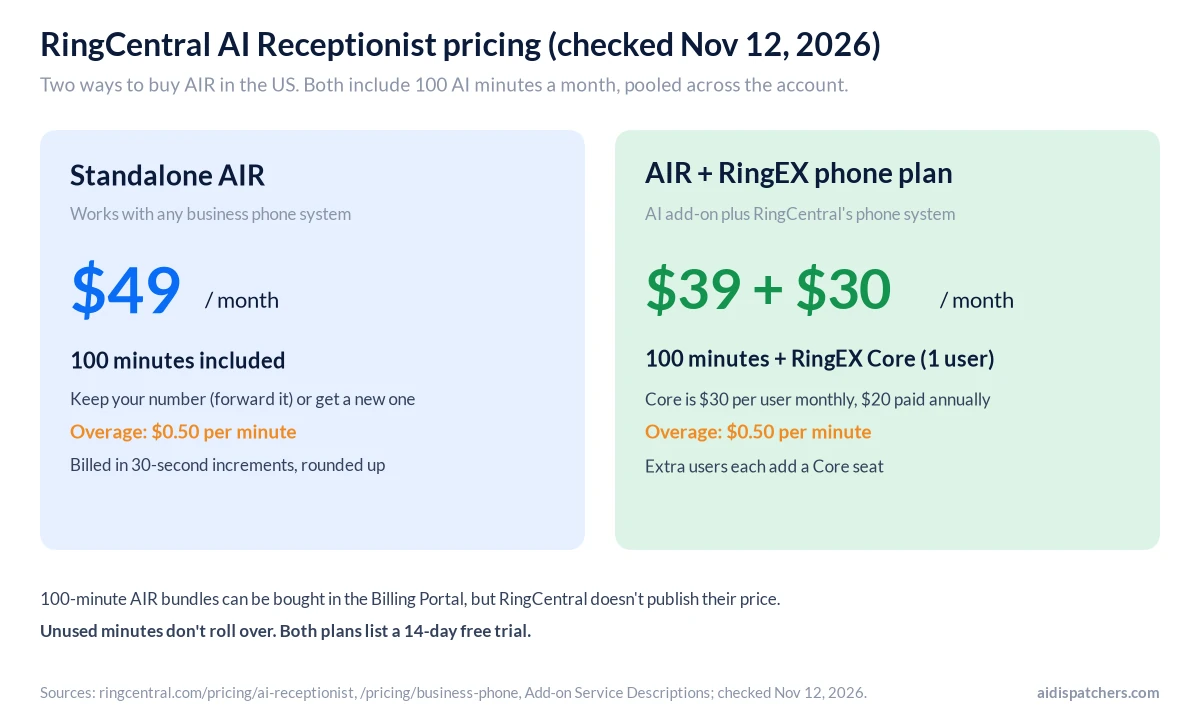
| Option | Monthly price | Minutes included | Extra minutes | Needs |
|---|---|---|---|---|
| Standalone AIR | From $49 | 100 | $0.50/min, 30-second increments | Any phone system (forwarding or SIP) |
| AIR + RingEX Core | From $39 + $30 per user (Core is $20 per user if paid annually) | 100 | $0.50/min, 30-second increments | A RingEX phone plan |
| AIR Customer Engagement Bundle | Quoted | 50 per user, pooled | Overage applies | RingCentral’s call center bundle |
A few rules from the Add-on Service Descriptions matter more than the plan cards. The 100 minutes are per license, per month, pooled across your account, and they don’t roll over. Extra usage is charged against the Calling Credits on your account, then as overage once those run out. That’s the same credit balance RingEX customers use for international calls. RingCentral also sells 100-minute AIR bundles in its billing portal, but it doesn’t publish their price.
Standalone or add-on: which is cheaper?
The add-on looks cheaper at $39, but it only makes sense if you were going to buy RingEX anyway. One RingEX Core user costs $30 a month on monthly billing or $20 a month paid annually, so the add-on route starts at $69 (or $59) against $49 for the standalone plan. Each extra person on RingEX adds another seat.
For that extra $10 to $20 you’d also get RingCentral’s phone service itself, so your team makes and takes calls in its app, each person gets a number, and calls can be recorded. Shopping for a new phone system anyway? Then the bundle is a fair deal. Happy with your carrier? Stay standalone and forward the line. Nextiva sells its AI receptionist the same two ways, and our Nextiva AI receptionist review covers how its per-conversation pricing stacks up.
What a month costs
The math is simple until you pass 100 minutes. After that, every extra minute adds 50 cents.
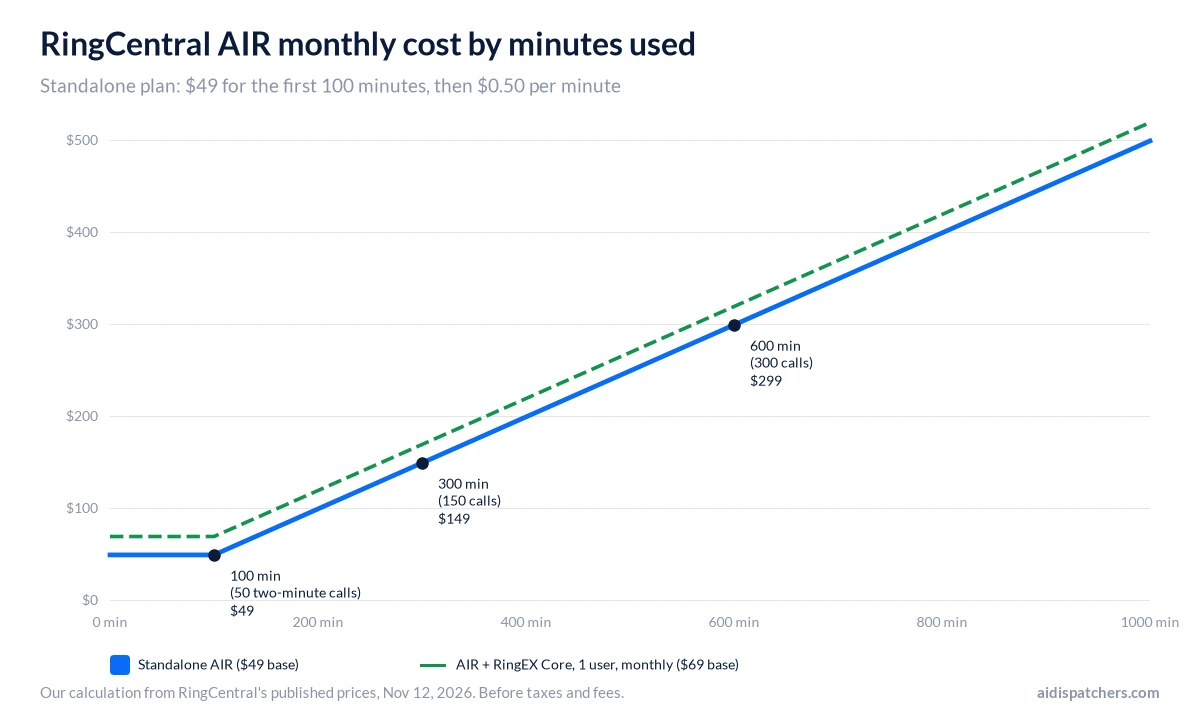
At two billed minutes a call, 100 calls come to 200 minutes and $99. Three hundred calls come to 600 minutes and $299. A business taking 15 calls a day, five days a week, lands somewhere around 650 minutes, and that’s before you count rounding.
How RingCentral counts AIR minutes
The footnote on the pricing page says call time “is rounded up and billed in 30-second increments.” Each call is rounded on its own. A 10-second wrong number bills 30 seconds, and a 65-second call bills 90.
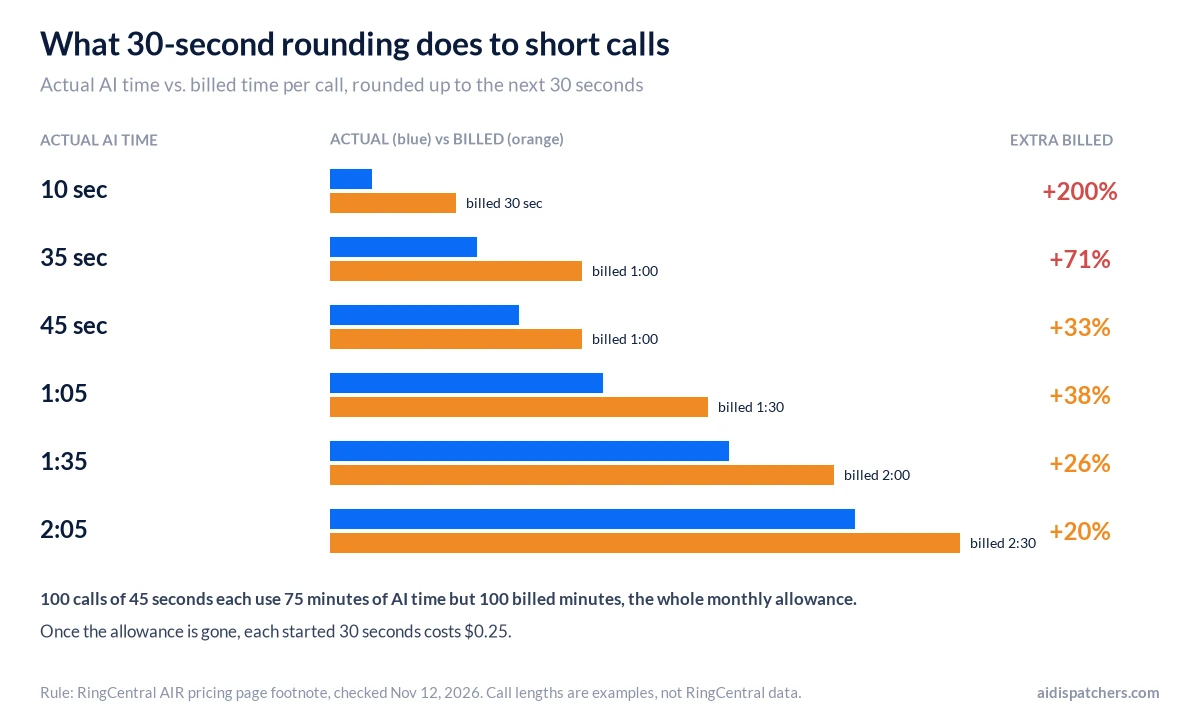
For long calls the rounding hardly matters. For a line full of quick ones it does. Take 100 calls that each run 45 seconds. That’s 75 minutes of AI time, but each call bills a full minute, so the month’s 100 minutes are used up.
One user on RingCentral’s subreddit said it was worse than that. In September 2025 they wrote that they’d added up their calls at 32 minutes and been charged for 61, and that a test call where they asked for a person within three seconds showed up in the log as 31 seconds. That’s one account and it’s more than a year old. It’s still a good reason to compare your usage report against your own call log in the first week.
There’s some good news on transfers. When a user asked whether a call keeps using AIR minutes after it’s handed to a person, RingCentral’s community support account replied in July 2026 that minutes count only “while the AI is actively handling the call” and stop once the call bridges to a human extension. So a one-minute AI greeting followed by a 15-minute conversation with your staff uses one minute of AIR time, not 16.
The contract details worth reading
AIR runs under RingCentral’s general terms of service, and four clauses there deserve a look before you buy.
- Auto-renewal. Services renew for the same length as your first term unless either side gives notice at least 30 days before the term ends.
- Add-ons follow your existing term. Anything you add to an account runs “coterminously” with the services you already have. Add AIR halfway through an annual RingEX contract and it’s tied to that contract’s end date.
- Early cancellation. If you end a service early for any reason other than RingCentral’s breach, the terms say you owe what’s left for the rest of the term.
- Billing disputes. You have 30 days from the invoice date to dispute a charge in writing. Late payments carry a fee of up to 1.5% a month.
Removing it seems to be where people get stuck. In an April 2026 thread on r/RingCentral, a customer said they’d asked support to remove AIR more than a month earlier and were still being charged. Another commenter replied that you can only drop it without charge within the first 30 days of adding it or at renewal. That’s a user’s reading, not RingCentral’s wording, so ask for the cancellation terms in writing before you start the trial.
RingCentral AI Receptionist reviews: what users say
On G2, AIR had 4.4 out of 5 from 57 reviews on November 12, 2026, with 61% five-star and 36% four-star. That pile of reviews is new. A Counter & Crew check in September 2026 found six, and the reviews on the first page are dated August to November 2026.
People who like it mostly say the same three things. After-hours callers finally get an answer, the “what time do you close” calls stop pulling staff off the floor, and a transfer shows up with a short summary. A multi-location retailer liked that each store could have its own hours and greeting, although setting up each location one at a time took a while.
The complaints are consistent too. A senior software analyst who gave it four stars on November 6, 2026 wrote that “the roughly 100 included minutes disappear quickly” and that overages at about 50 cents a minute, rounded in 30-second increments, mean “I have to keep a close eye on usage.” They also said it can get stuck when a caller asks two unrelated things at once. A reviewer on November 10 said it “still struggles when the caller has background noise or a strong accent” and sometimes holds the line too long before transferring. A reviewer who runs a dental practice said a busy month’s overage “bit us harder than expected.”
Reddit is less kind. A user in a June 2026 thread called it “really limited” and said “too many of the controls are abstracted away from us.” In January 2026, another wrote that RingCentral told them AIR couldn’t email staff when a call came in, so someone had to check the admin console, and that it could only text one Calendly link. Both may have changed since; the May 2026 update added Calendly booking.
The company itself gets rougher treatment. Its Trustpilot page sat around 1.7 out of 5 on about 2,000 reviews in November 2026, going by search snapshots, since Trustpilot blocked our own check. Few of those are about AIR. Most are people fighting a bill or trying to cancel phone service.
A month of calls: RingCentral vs. other AI receptionists
To compare, we priced 40, 100 and 150 calls a month using each company’s cheapest published plan for that volume, checked November 12, 2026. We assumed each call bills two minutes after rounding. Smith.ai’s AI plans charge per call, so call length doesn’t change its column.
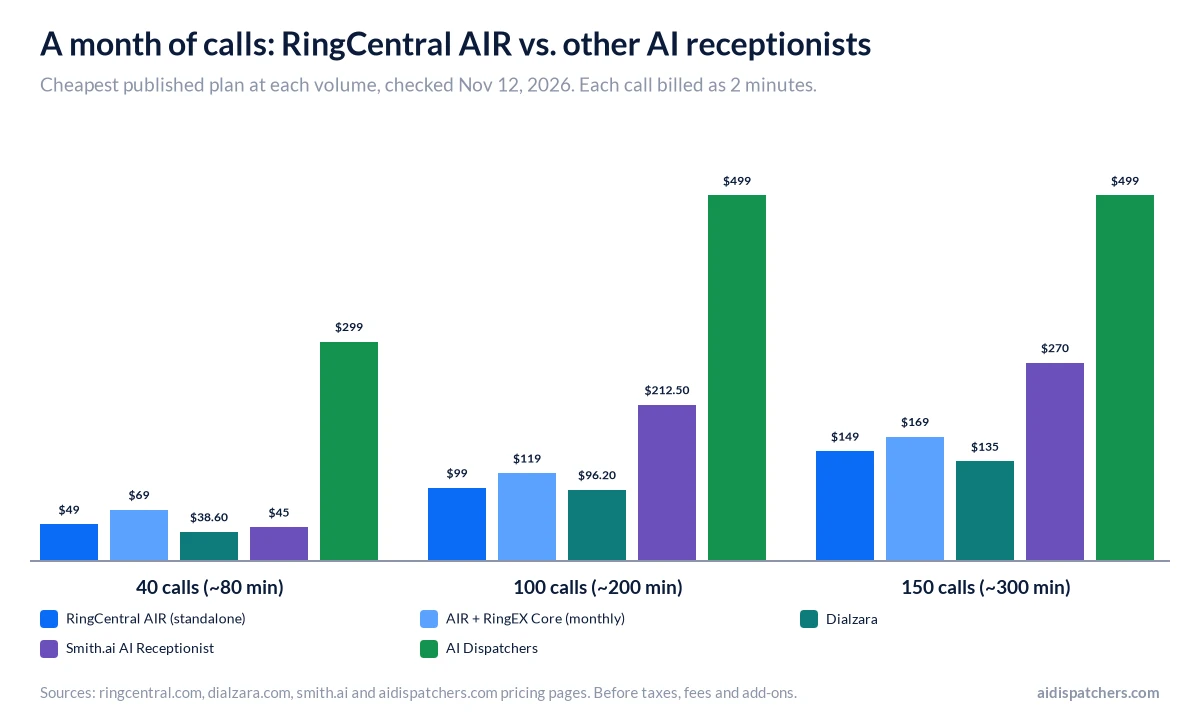
| Service | 40 calls (~80 min) | 100 calls (~200 min) | 150 calls (~300 min) |
|---|---|---|---|
| RingCentral AIR, standalone | $49 | $99 | $149 |
| AIR + RingEX Core, 1 user, monthly | $69 | $119 | $169 |
| Dialzara | $38.60 (Lite) | $96.20 (Lite) | $135 (Pro) |
| Smith.ai AI Receptionist | $45 (Free tier) | $212.50 (Pro, 75 calls) | $270 (Pro, 150 calls) |
| AI Dispatchers (ours) | $299 | $499 | $499 |
Dialzara’s Lite plan is $29 for 60 minutes plus 48 cents a minute, and its Pro plan is $99 for 220 minutes plus 45 cents. Smith.ai’s free AI tier covers 25 calls and charges $3 for each one after that. Its Pro plan is $150 for 75 calls ($2.50 per extra call) or $270 for 150. Our Starter plan is $299 for the first 100 minutes, and Growth is $499 for up to 300.
Two things move these numbers. Longer calls hurt the minute-based plans (RingCentral, Dialzara and ours) and leave Smith.ai’s per-call price where it is. Short calls hurt RingCentral the most because of the 30-second rounding. Our answering service cost guide runs the same math for live services, and the Smith.ai review covers its human plans. If you want an AI that can pass calls to live receptionists on the same plan, Abby Connect sells that mix, and we priced it in our Abby Connect review.
Who RingCentral AIR suits, and who should skip it
Already on RingEX? Then AIR is an easy add. It also does well when callers want simple things like hours, directions or “can I book Tuesday?”, and when someone on your team will spend an afternoon writing intake questions and calling in to test them. That’s the kind of setup the happy G2 reviewers describe. Got more than one location? Each can have its own hours and greeting.
Think twice if your calls are short and frequent, since rounding will eat your minutes, or if you need someone to set it up for you. Same if callers often ask two or three things in one breath, or if a surprise bill would really hurt. A small service business that gets 20 calls on a slow day and 80 on a storm day is exactly where the metered bill jumps.
If you’re still deciding whether an AI should answer at all, our AI receptionist vs. human receptionist comparison walks through which calls need a person, and our guide to choosing an AI receptionist compares more AI options.
Five things to test during the 14-day trial
- Count the robocalls. Note how many spam calls reach the AI in the first week. Every one of them bills at least 30 seconds.
- Make five test calls: a new customer, an existing one with a two-part question, a caller in a noisy car, a wrong number and someone who asks for a person straight away. Time each one.
- Check the usage log against your stopwatch and your carrier’s call records. Small gaps come from rounding. Big ones are worth a support ticket.
- Find out how your team learns about a call. Make sure a text, email or CRM entry reaches someone without logging in to the admin portal.
- Get the cancellation terms in writing before the trial converts, including whether the add-on is tied to your RingEX contract term.
Where AI Dispatchers fits
On price, we lose this comparison. Our published plans are $299 a month for the first 100 minutes and $499 for up to 300. RingCentral’s standalone plan doesn’t reach $299 until about 600 minutes, and at 300 minutes it’s $149 against our $499. Dialzara is cheaper than both of us, and so is Goodcall, which bills per caller instead of per minute.
What our price pays for is the setup. Every plan includes setup and onboarding: in a 30-minute session we configure the agent with your services, pricing, hours and scheduling rules, so you aren’t left to build it alone in a portal. If you’d rather build and tune it yourself and your calls are simple, start with RingCentral’s trial. If you’d rather have the agent set up for your call types and hear it first, book a demo or send us a note with the form below.
Frequently asked questions
How much does RingCentral AI Receptionist cost?
The standalone plan starts at $49 a month and the RingEX add-on at $39 a month, both with 100 minutes. Extra minutes cost $0.50 each, billed in 30-second steps. The add-on also needs a RingEX seat, which is $30 per user monthly or $20 paid annually.
Does RingCentral have an AI receptionist?
Yes. It’s called AI Receptionist, or AIR. It answers calls and texts around the clock, books appointments, takes lead details and transfers callers with a summary. You can buy it on its own or as an add-on to RingCentral’s RingEX phone system.
How does RingCentral AI Receptionist work?
Setup starts with your website or Google Business Profile. AIR reads it and drafts a first version with your hours, services and common questions. Then you fix what it got wrong, write the questions it should ask new callers, pick who gets transfers, and forward your line. Every call gets a recording and transcript, which is how you spot the answers it fumbles.
Do I need RingCentral’s phone system to use AIR?
No. You can buy the standalone version and forward your current number to it, or hook it up over SIP if your phone system supports that. Your carrier stays. If forwarding breaks on their end, though, RingCentral’s terms put that on you, not them.
Is there a free trial of RingCentral AI Receptionist?
Yes. RingCentral lists a 14-day free trial for both the standalone plan and the RingEX add-on. Use it to time real calls against the usage log, and get the cancellation terms in writing before it converts.
Do AIR minutes keep counting after a call is transferred?
According to RingCentral’s community support team on Reddit in July 2026, no. Minutes count only while the AI is handling the call, and the meter stops when the call connects to a person. The AI part of the call is still rounded up to the next 30 seconds.
Do unused RingCentral AIR minutes roll over?
No. RingCentral’s service terms say the 100 minutes are per license per month, pooled across the account, with no roll-over. You can buy 100-minute bundles in the billing portal, but RingCentral doesn’t list their price publicly.
Is RingCentral AI Receptionist available outside the US?
Partly. RingCentral’s terms say the standalone version is sold to direct customers in the United States and Canada. With RingEX, AIR is also offered in the UK, the EU and Australia. Canada has its own price list, so check the local page.
Talk to us about your calls
Tell us a little about your business and a specialist will get back to you. Fields marked * are required.