
Short version: voicemail is fine if you don’t get many calls and nobody’s in a hurry. Pick a live answering service if you want a human voice on every call and a message is all you need. An AI receptionist makes sense when you want calls answered at any hour and wrapped up right there, with the appointment booked and a confirmation texted. Lots of businesses end up using two of the three.
These are the questions owners ask most when they’re deciding, with straight answers.
What’s the difference between the three?
Voicemail records a message. Nothing happens until you listen and call back.
A live answering service is a team of people, usually at a call center, who answer for many businesses. They follow a script you give them. Most take messages; some will book appointments or patch calls through to you, often for an extra fee.
An AI receptionist is software that answers in your business’s name, talks with the caller, and acts on what it hears: answering common questions, asking your intake questions, booking into your calendar, texting a confirmation and flagging urgent calls. AI Dispatchers is one.
A virtual receptionist usually means a remote human receptionist, though some companies use the term for AI too. If you see it on a pricing page, check which one you’re getting.
Is an AI receptionist better than an answering service?
For routine calls that should end in a booking, usually yes. For calls that need human judgment or empathy, often no.
An AI receptionist is consistent. Every caller gets the same intake questions, the quote is your actual service fee, and the booking goes into a real open slot, whether it’s 2 p.m. Tuesday or 2 a.m. Sunday.
A good human agent is better with the unusual call: the caller who’s upset and rambling, the long-time customer with a complicated history, the situation your script never imagined.
Our take: for most small businesses, the best setup is the AI handling the bulk of the calls and a person (you, someone on your staff or a live service) picking up the ones it flags. If you’re weighing AI against hiring a receptionist of your own, we compare the two in AI receptionist vs human receptionist.
Is voicemail good enough for a small business?
It can work. You’d need to get only a handful of calls a day and be good about calling back within the hour. Your callers also can’t be in a hurry. A bookkeeper with ten long-term clients probably doesn’t need anything else.
It’s a weak choice when callers have options and a problem right now. Someone with water on the kitchen floor or a toothache isn’t going to wait for a callback. They’ll try the next result.
You’ll find plenty of stats online about how many callers hang up on voicemail. They’re all over the place, and a lot of them come from companies selling phone tools, so we’re not going to quote one. Your own phone is a better source. Compare last month’s missed calls with the voicemails you actually got. Our guide to what a missed call costs shows how to turn that into a dollar figure.
Which is cheapest?
Voicemail is free. After that it depends on volume and call length.
Live services usually bill per minute or per call. As one published example, Specialty Answering Service lists $159 a month for 100 minutes plus $1.44 per extra minute, and Smith.ai’s human receptionists start at $300 a month for 30 calls (both checked October 17, 2026). AI receptionists generally charge a flat monthly fee; ours is $299 for 100 minutes or $499 for 300, with setup and onboarding support included. See our full breakdown of answering service costs for worked monthly bills.
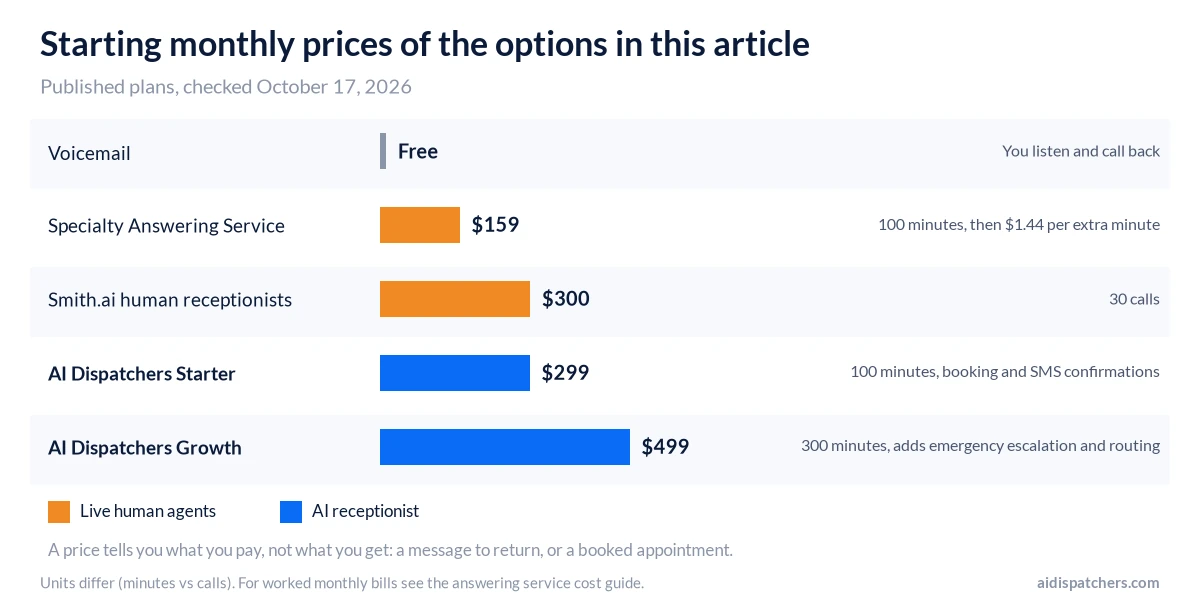
We’re not the cheapest, and if you get few calls and only need messages, a small live plan can cost less. The better question is what you get for the money: a message you still have to return, or a booked appointment.
Do callers hang up when they hear an AI?
Some do. But we think people hang up on bad calls more than they hang up on AI. Long menus, a voice that keeps repeating itself, no way to reach a person: that’s what sends them off.
What helps:
- Say it up front. “Hi, you’ve reached Ridgeline Plumbing, I’m the virtual assistant.” Honest and quick.
- Get to the point. Ask what they need, not five menu questions.
- Offer a human. If someone says “let me talk to a person,” the AI should take a message or transfer, not argue.
- Watch your transcripts for the first two weeks and fix where callers drop off.
You can set a disclosure greeting, including that the call may be recorded; our security page notes that disclosure greetings are configurable. Recording-consent rules vary by state, so pick wording that fits where you operate.
Can an AI receptionist handle emergency calls?
It can recognize them and get them to a person fast, if you set clear rules. It shouldn’t try to solve them.
For an HVAC company, an emergency might be no heat with an elderly person in the home. For a plumber, active water you can’t shut off. For a law firm, a family member calling about an arrest. You decide the triggers and what the AI asks to check for them. On our Growth plan, emergency and priority escalation is how those calls are flagged for your on-call person; routine calls get booked into the next open slot.
A live answering service can do this too, usually by calling down a list. Voicemail can’t, which is the biggest reason trades move off it.
What does each option look like in practice?
Three quick scenarios.
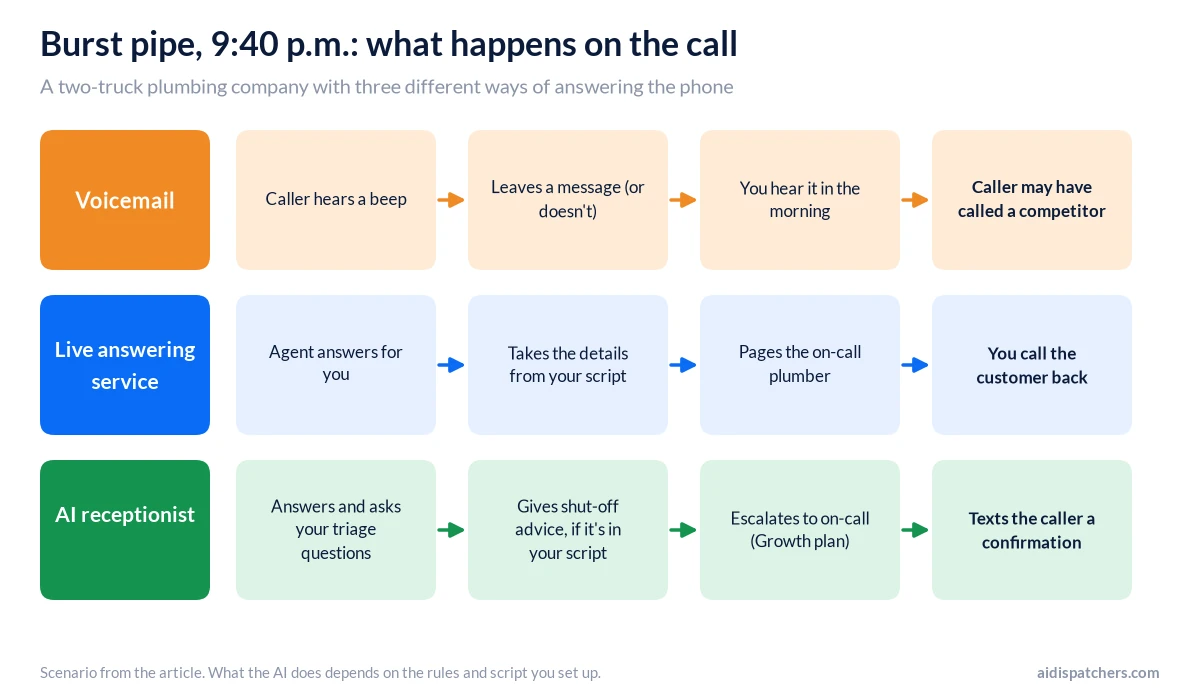
A two-truck plumbing company, 9:40 p.m., burst pipe. With voicemail, the homeowner hears a beep and calls a competitor. With a live service, an agent takes the details and pages the on-call plumber. With an AI receptionist, it asks your triage questions, tells the caller to shut off the main if they can (if that’s in your script), escalates to the on-call plumber on the Growth plan, and texts the caller a confirmation. See how that works for plumbing and HVAC.
A hair salon on a Saturday. The stylists are all mid-cut, and the phone rings eight times in an hour. Voicemail fills up fast. A live service would write down names and numbers to call back Monday. An AI receptionist could book the open slots and text each person a confirmation. We have a page for salons too.
A family law office at 8 p.m. A prospective client calls about a custody issue. Voicemail may lose them. A live service takes a message, and some will run an intake script. An AI receptionist runs your intake questions, says plainly it can’t give legal advice, and books a consultation. More on that for law firms.
Can I use an AI receptionist and a human together?
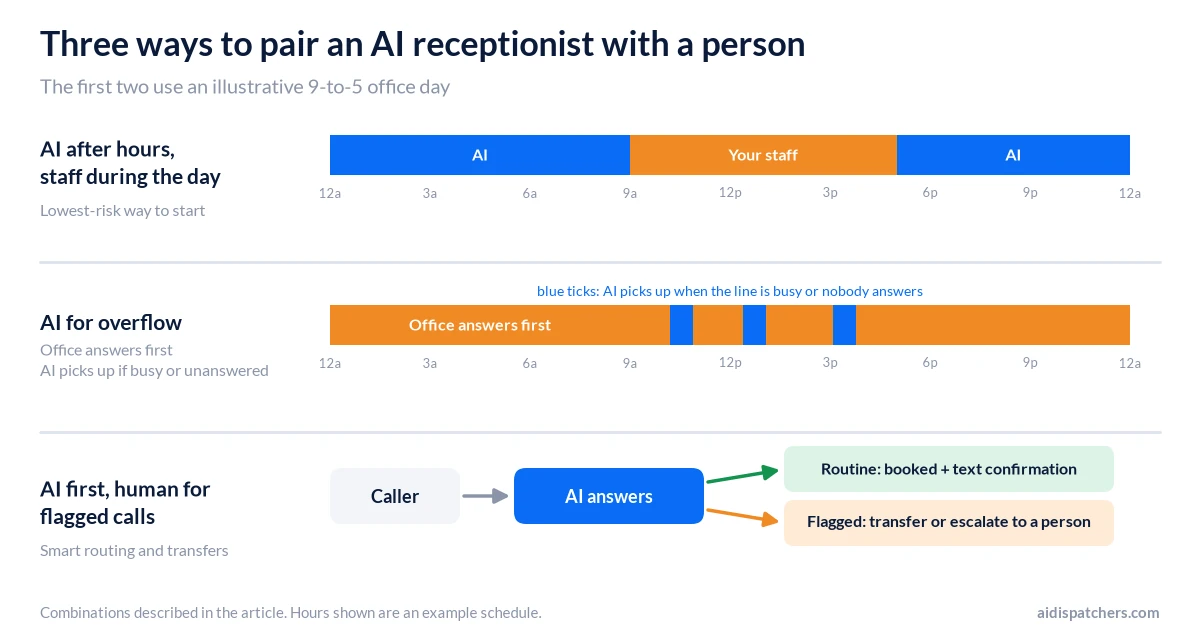
Yes, and this is often the best setup. Common combinations:
- AI after hours, staff during the day. The lowest-risk way to start.
- AI for overflow. Your office answers first; the AI picks up when the line’s busy or nobody grabs it within a few rings.
- AI first, human for flagged calls. The AI handles routine calls and transfers or escalates the rest. Smart routing and transfers are on our Growth plan.
So which one should you pick?
Go by the call you can least afford to miss.
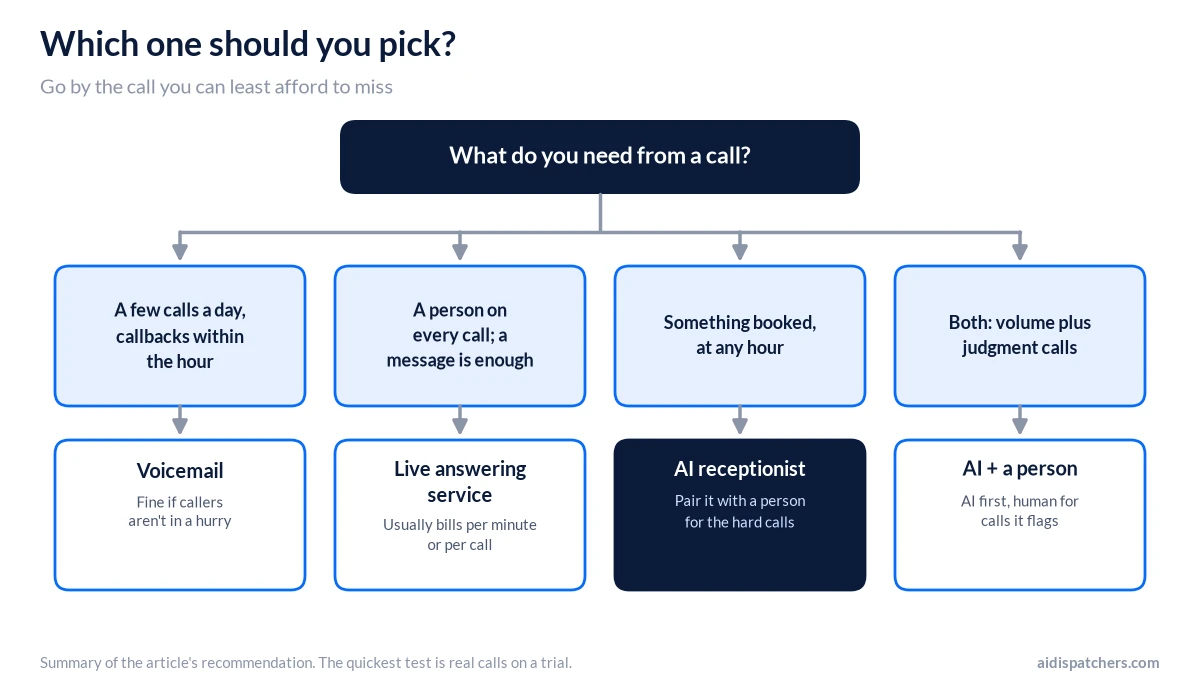
If you can wait a few hours to call people back, voicemail is fine. If you want a real person talking to every caller and a message is enough, go with a live answering service. If the call has to end with something booked, whatever the hour, that’s the job an AI receptionist is for, and you can still put a person on the hard calls.
The quickest way to find out is to try it on real calls. Put AI Dispatchers on your after-hours or overflow line for 14 days, read the transcripts, and compare them with what your voicemail would have caught. Start your 14-day free trial. If you’re comparing vendors, our guide to the best AI receptionist covers how to test them, and you can talk to us with any questions. For the texting side, see our business texting guide.
Frequently asked questions
What’s the difference between an AI receptionist and an answering service?
A live answering service is a team of people, usually at a call center, who answer for many businesses and follow a script you give them. Most take messages, and some book appointments or patch calls through for an extra fee. An AI receptionist is software that answers in your business’s name, asks your intake questions, books appointments and texts a confirmation.
Is an AI receptionist better than a human receptionist?
For routine calls that should end in a booking, an AI receptionist is consistent: it asks every caller the same questions and books into real open slots at 2 p.m. or 2 a.m. A person is better with the upset caller, the long-time customer with a complicated history, or a situation your script never covered. Most small businesses do best with AI handling the volume and a person taking the calls the AI flags.
What is a virtual receptionist, and is it a person or AI?
Usually it means a remote human receptionist, but some companies use the term for AI too. The quickest way to tell is to ask whether a person or software answers the call. Per-minute or per-call pricing is typical of staffed services, and a flat monthly plan is typical of AI.
Is voicemail good enough for a small business?
It can be if you get only a handful of calls a day, you reliably call back within the hour and your callers aren’t in a hurry. A bookkeeper with a few long-term clients may not need anything more. It’s a weak choice when callers have a problem right now, like water on the kitchen floor, because they’ll try the next result instead of waiting for a callback.
Do callers hang up when they hear an AI?
Some do, but in our view people mostly hang up on bad calls (long menus, robotic repetition, no way to reach a person) rather than on AI itself. Say it up front, get to the point quickly, and offer a human if the caller asks. Watch your transcripts for the first two weeks to see where callers drop off.
Do I have to tell callers it’s an AI?
There’s no single rule that fits everywhere, so check the rules where you operate. Some states have disclosure rules for AI in certain situations, and call-recording consent laws differ from state to state. A greeting like "Hi, you’ve reached [business name], I’m the virtual assistant, and this call may be recorded" is honest and quick. This isn’t legal advice, so ask a lawyer if you’re unsure.
Can an AI receptionist handle emergency calls?
It can recognize them and get them to a person fast if you set clear rules, but it shouldn’t try to solve the emergency. You decide what counts as urgent, such as no heat with an elderly person in the home or active water you can’t shut off, and what the AI asks to confirm it. On AI Dispatchers, emergency and priority escalation is part of the Growth plan. A live service can do this too, usually by calling down a list; voicemail can’t.
Can I use an AI receptionist and a human together?
Yes, and it’s often the best setup. Common versions are AI after hours with staff during the day, AI for overflow when the line is busy, or AI first with transfers to a person for calls it flags. Starting with after-hours calls is the lowest-risk way to try it.
Talk to us about your calls
Tell us a little about your business and a specialist will get back to you. Fields marked * are required.