
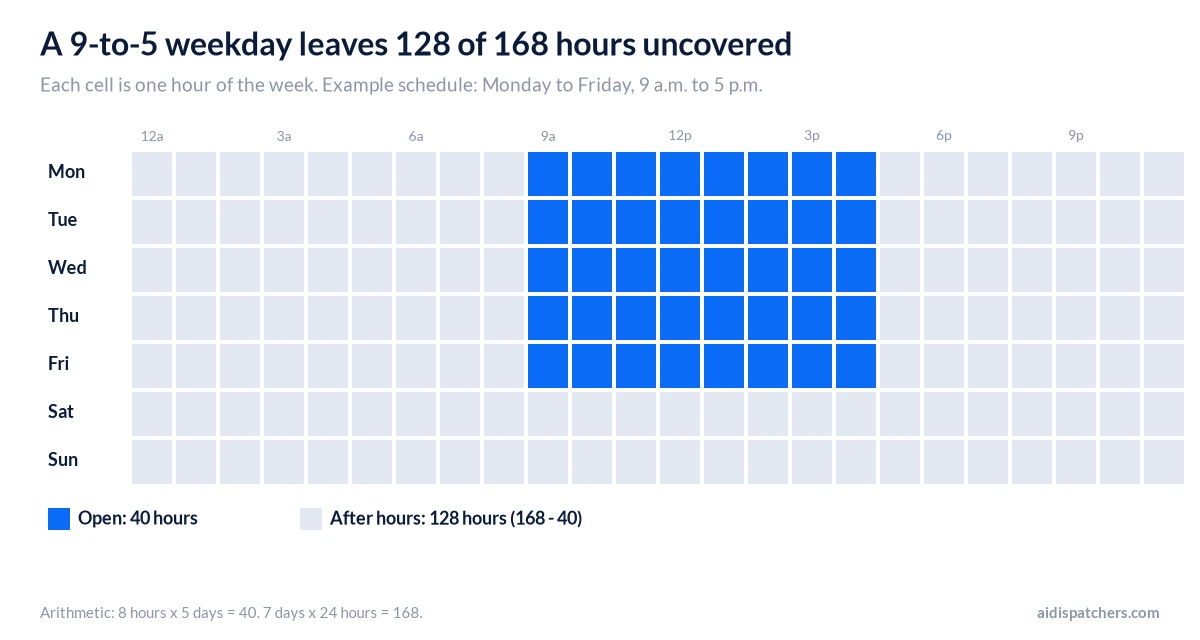
A shop that’s open nine to five, Monday to Friday, is open 40 hours out of 168. The other 128 hours belong to whatever picks up the phone. That is what an after hours answering service is: a person at a call center, an AI voice agent, or plain voicemail, covering the hours your team isn’t there.
How you cover those hours depends on how many calls come in at night, how urgent they are and what one booked job is worth. We priced the published plans at 20 and 60 after-hours calls a month, straight off each vendor’s own pricing page on October 18, 2026. We also cover how forwarding works and how to make sure an emergency lands on a real phone.
What is an after hours answering service?
It’s a service that takes your business line when nobody on your team will. Evenings, weekends and holidays are the obvious cases. Lunch breaks count too, and so does the second call that arrives while you’re still on the first. The service greets the caller in your business name, asks the questions you’ve set, and sends you the result as a message, a text or an email. Some also book appointments, or ring your on-call person when a call can’t wait.
Voicemail does none of that. A caller with a real problem tends to try the next company instead of leaving a message and waiting for your morning callback.
How does an after hours answering service work?
The mechanics are the same whether a person or software answers.
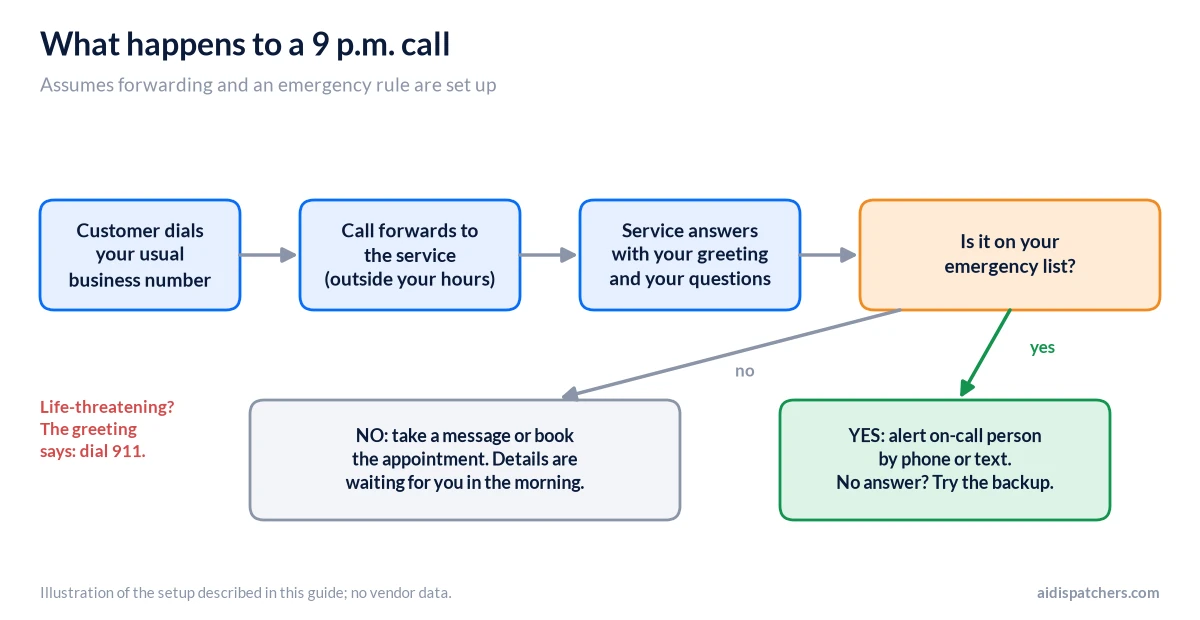
- A customer dials the business number they already know.
- Outside the hours you’ve set, the call is forwarded to the service. Some services will also take over your existing number: Smith.ai, for one, lets you port it at no charge.
- The service answers with your greeting and asks your questions.
- The details reach you afterward. Anything you’ve defined as an emergency gets pushed to your on-call person right away.
Forwarding is the step where small businesses get stuck. On a mobile line you can do it with dial codes. Verizon’s support page, for example, says to dial *72 plus a 10-digit number to forward every call, *71 plus the number to forward only the calls you don’t answer, and *73 to switch it off. If you’re not on an unlimited plan, forwarded calls count against your minutes, and text messages don’t forward at all. Codes differ by carrier, so check yours.
A business phone system or VoIP service usually lets you schedule forwarding by hour, which beats remembering to flip a switch at 5 p.m. Smith.ai’s FAQ makes the same point. Tell them which hours you want covered, and calls outside those hours go to a number you choose or to voicemail.
Which kind of after hours answering service should you pick?
There are four ways to cover those 128 hours. Most businesses already use one of them without having picked it.
| Option | Who answers | Published cost | Where it falls short |
|---|---|---|---|
| Voicemail | Nobody | Nothing extra if you already have it | No answers and no booking. Urgent callers move on. |
| Forward to your cell | You or an employee | Your evenings, plus carrier minutes | You’re on call every night, and a second call goes to voicemail. |
| Live answering service | A trained person at a call center | From $44 a month plus $1.54 a minute (Specialty) to $2,100 for 300 calls (Smith.ai) | Billed by the minute or the call, so long callers cost more. Extras like booking are priced per call at Smith.ai. |
| AI receptionist | Software trained on your business | Entry plans from $29 to $299 a month (see the table below) | Can stumble on questions it wasn’t set up for. Features like warm transfers and after-hours rules often sit on higher tiers. |
Plenty of businesses mix these: a person by day, an AI or live service at night. Trades are a good example. In an HVAC or plumbing shop the after-hours calls that matter are the emergencies, like no heat or a burst pipe, and our pages for HVAC, plumbing and home services show how AI Dispatchers fits that kind of work. For a closer look at the live-versus-AI choice, see AI receptionist vs answering service vs voicemail.
How much does an after hours answering service cost?
Live services run from about $44 a month into the thousands. The entry plans for the AI services below start between $29 and $299. Most of the spread comes from how each vendor counts: per minute, per call, per unique caller, or a flat bucket of minutes. Our full answering service cost guide goes deeper on the billing models and hidden fees.
Nights usually aren’t a separate line item. Smith.ai’s pricing page says calls at 2 pm and 2 am cost the same. Ruby lists 24/7 coverage, including after-hours, weekends and holidays, in all of its plans, and says there are no extra fees for coverage periods. Abby lists custom answering hours, including 24/7, with no weekend upcharge. Get the after-hours and holiday rate in writing anyway.
| Service | Type and billing | Published plans (monthly) | Worth knowing |
|---|---|---|---|
| Specialty Answering Service | Live, per minute | Economy $44 + $1.54/min. $159 (100 min), $269 (220), $649 (500) | Extra minutes $1.44 to $1.34. Billed by the second. Free trial of 2 weeks or 200 minutes, no credit card, per its page. |
| Smith.ai | Live, per call | $300 (30 calls), $810 (90), $2,100 (300) | Overage $11.50, $10.50 or $8.50 a call. Booking is $1.50 a call, text or Slack alerts $0.50, complex routing $1.50. 30-day money-back guarantee. |
| Abby | Live (AI optional), per minute | $165 (50 min), $329 (100), $599 (200), $1,380 (500) | AI answering counts as half an Abby Minute. Overage rate isn’t shown on the page. |
| Ruby | Live, by receptionist minutes | Plans for 50, 100, 200 and 500 minutes | Prices weren’t displayed on its pricing page, so you’d need to ask sales. |
| Rosie | AI, minutes | $49 (250 min), $149 (1,000), $299 (2,000) | Says it handles multiple calls at once. Calendar booking starts at $149. 7-day trial. |
| Goodcall | AI, unique customers | $79 (100 customers), $129 (500), $299 (2,000) | Extra customers cost 79¢, 26¢ or 15¢ each, depending on plan. No minute billing. |
| Dialzara | AI, minutes | $29 (60 min), $99 (220), $199 (500), $349 (1,000) | After-hours rules and escalation start on the $99 plan. 7-day trial. |
| AI Dispatchers | AI, minutes | $299 (100 min), $499 (300), Enterprise custom | Emergency and priority escalation is on the $499 Growth plan. Setup support on every plan. 14-day free trial. |
Sticker prices don’t mean much until you plug in a volume. Picture one business with 20 after-hours calls a month and another with 60. Calls average three minutes (use your own number). The chart shows the cheapest published plan that covers each.
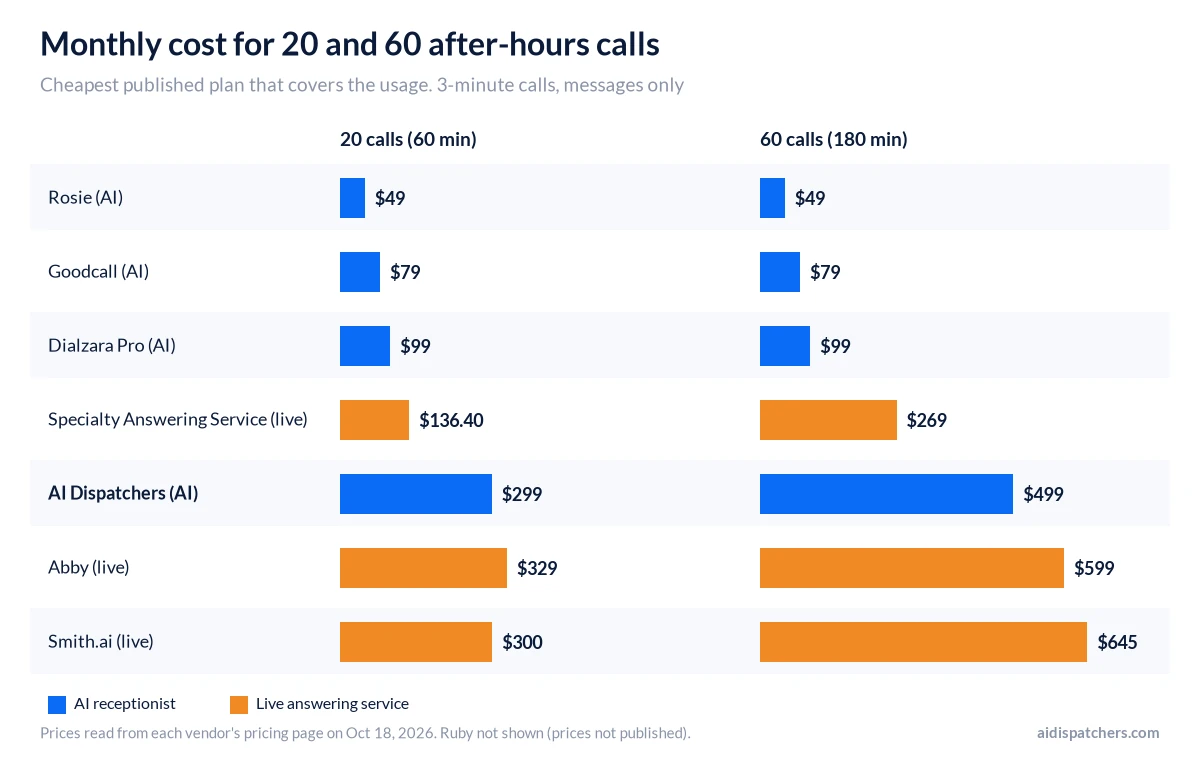
Some of those numbers aren’t obvious. Specialty’s Economy plan beats its 100-minute bundle until about 75 minutes a month. That’s why Economy is cheapest at 20 calls (60 minutes) and the 220-minute bundle is cheapest at 60 calls (180 minutes).
Smith.ai at 60 calls comes to $645: the $300 plan plus 30 calls of overage, which still lands under the $810 plan. Dialzara shows its $99 plan at both volumes, because the $29 plan has no after-hours rules or escalation. Abby doesn’t publish its overage rate, so we priced the smallest plan that covers the minutes.
We’re at the expensive end here, and there’s no point hiding it. AI Dispatchers at $299 (100 minutes) costs six times what Rosie charges for 250 minutes at $49, and at 180 minutes we’d put you on Growth at $499, because the overage rate for Starter isn’t on our plan page. What the extra money buys is setup help (we configure the AI with your services, prices, hours and scheduling rules) and, on Growth, emergency escalation. If you only need messages taken for 20 calls a month, one of the cheaper plans is the sensible buy. If Rosie is on your shortlist, our Rosie AI pricing review covers what happens when a busy month pushes you past 250 minutes.
The emergency part has its own price tags. Smith.ai bills $0.50 a call for a text or Slack alert when a caller qualifies for a transfer, plus $1.50 a call for custom routing. Specialty charges $0.10 a minute for patching, which is the connection to your phone.
Is an after hours answering service worth the money?
Count before you buy. Pull 30 days of phone records and tally the calls that came in outside your hours and went unanswered. Then put a dollar value on a booked job.
Here are made-up numbers, so swap in yours. Say 25 calls went unanswered, one in five of those callers would have booked, and a job averages $400. That’s five jobs and $2,000 a month, which covers a $99 plan or a $499 one. Now say it’s four calls and the jobs are worth $60. Voicemail plus a fast callback may be all you need. Our piece on what a missed call costs walks through the same math with daytime calls.
How do you set up after hours coverage that handles emergencies?
The service can only follow the rules you give it, so most of the work is yours and it takes an afternoon.
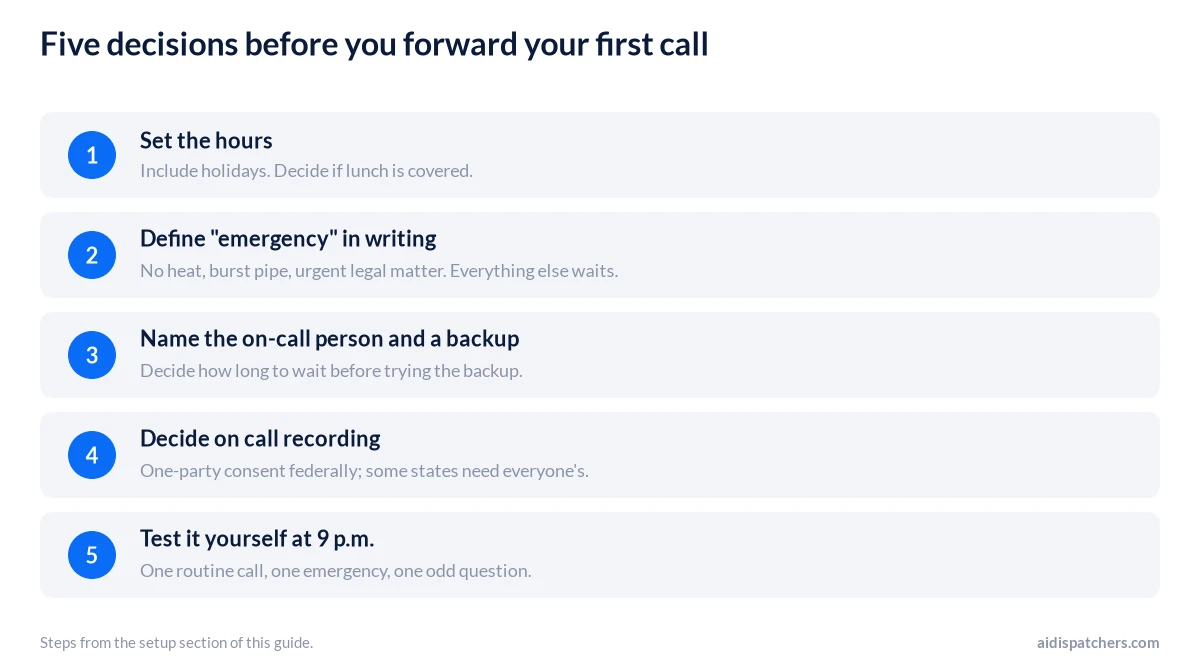
- Set the hours. Include holidays, and decide whether lunch is covered.
- Define “emergency” in writing. No heat on a freezing night, a burst pipe, a client who’s just been arrested: whatever applies to you. Anything not on the list waits for morning. Have the greeting tell callers to hang up and dial 911 if anyone is in danger, because an answering service isn’t a dispatcher.
- Name the person on call and a backup. Decide how long the service waits before it tries the backup.
- Decide on recording. Federal wiretap law needs the consent of one party to a call, but some states want everyone’s. Justia’s 50-state survey (last reviewed September 2024) lists California, Florida and Pennsylvania among the all-party states. Ask how the service announces recording.
- Test it yourself. Call at 9 p.m. from your cell phone with a routine question, an emergency and something odd. Check what arrives, who gets alerted and how fast.
Read the first week’s calls, all of them. You’ll almost certainly rewrite the script once. If you want a second opinion on whether our plans fit your call volume or whether a cheaper one will do, use the form at the bottom of this page. You can also compare vendors in our guide to the best AI receptionist.
Prices last checked October 18, 2026, on each vendor’s own pricing page. They change, so confirm before you buy.
Questions people ask about after hours answering services
What is an after hours answering service?
It’s a service that answers your business line when you’re closed, using people or software. It collects the details you’ve asked for and passes them on, and some will book appointments or transfer urgent calls. Voicemail just records. A daytime receptionist works your hours, and this covers the rest.
How much does an after hours answering service cost?
Prices vary a lot. Specialty starts at $44 a month plus $1.54 a minute, Abby at $165 for 50 minutes and Smith.ai at $300 for 30 calls (all checked October 18, 2026). AI plans start between $29 and $299 a month. Priced for 20 after-hours calls of three minutes each, the cheapest plans that cover them in our list ran $49 to $329 a month.
Do nights, weekends and holidays cost extra?
Mostly no. Smith.ai says calls at 2 pm and 2 am cost the same, Ruby includes after-hours, weekend and holiday coverage in its plans, and Abby lists no weekend upcharge. We haven’t read every provider’s terms, so get the after-hours and holiday rate in writing before you sign.
Is an after hours answering service worth it for a small business?
Do the math on your own numbers. How many calls do you miss after hours, and what’s a new customer worth? A handful of low-value calls a month may not justify a service, and voicemail with a morning callback can do the job. If one booked job pays the monthly fee, it’s an easy yes.
Can an AI receptionist answer after hours calls?
Yes, though plans differ. Dialzara lists after-hours rules and escalation from its $99 plan. Rosie says it can handle several calls at once on every plan. AI Dispatchers answers 24/7, with emergency and priority escalation on the $499 Growth plan. The weak spot is the question nobody planned for, so make some odd test calls before you rely on it for emergencies.
Does a medical or dental office need a HIPAA-ready after hours service?
Generally yes, if the vendor handles patient information for you. HHS says a covered entity may share it with a business associate once it has satisfactory assurances in writing, called a business associate agreement (BAA). Its examples include an AI chatbot that schedules appointments. Ruby and Abby list HIPAA-compliant options on their pricing pages. We make no HIPAA claim about AI Dispatchers in this guide, so ask any vendor, us included, for a signed BAA before forwarding patient calls.
What happens if a caller has an emergency after hours?
The service follows your rules. Typically that means taking the details and trying your on-call person by phone or text, then a backup if nobody picks up. Some plans charge extra for this: Smith.ai bills $0.50 a call for text alerts and $1.50 for custom routing, and Specialty bills patching at $0.10 a minute. For a life-threatening call, the greeting should say to dial 911. An answering service isn’t a dispatcher.
Can a law firm use an after hours answering service?
Yes. The thing to check is intake: which questions get asked, whether a conflict check is possible, and where the notes go. Smith.ai’s price page lists conflict checks at $0.50 a call and a Clio integration, so ask any provider for the same. Keep the calls to intake only. A service shouldn’t be giving legal advice.
Talk to us about your calls
Tell us a little about your business and a specialist will get back to you. Fields marked * are required.