
There isn’t one best AI receptionist. There’s a best fit for how your calls actually go. A solo plumber who misses calls under a sink needs something different from a law firm doing intake or a salon booking haircuts. The right pick is the one that handles your five most common calls well, hands off the tricky ones to a person, and costs a sensible amount at your real call volume.
Full disclosure: we sell one of the products below. We’ve tried to make the criteria useful whichever one you choose, and every competitor detail comes from that company’s own pricing page as of October 17, 2026. We haven’t run test calls against the competitors, so this page compares published plans, not call quality.
What actually matters when choosing an AI receptionist?
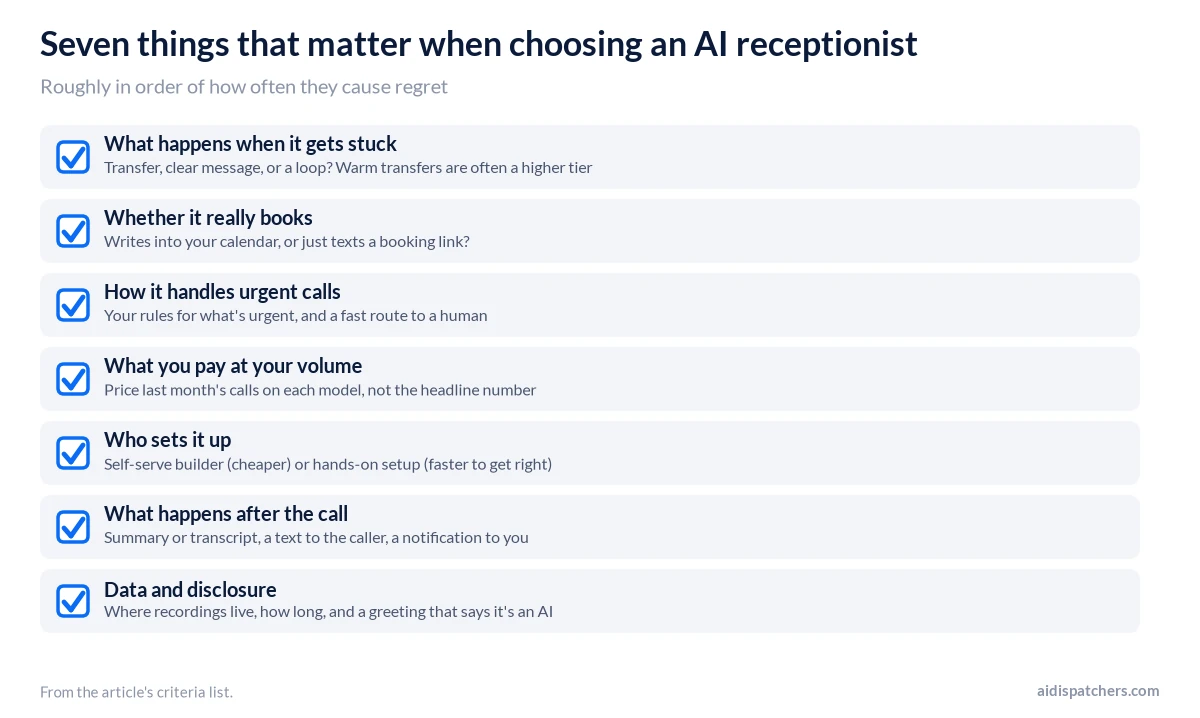
Seven things, roughly in order of how often they cause regret.
1. What happens when it gets stuck. Every AI hits a question it can’t answer. Does it transfer to a person, take a clear message, or loop? Warm transfers (where the AI briefs your team before connecting) are often a higher-tier feature, so check which plan includes them.
2. Whether it really books. “Books appointments” can mean writing directly into your calendar or just texting the caller a booking link. Both are fine; know which you’re buying.
3. How it handles urgent calls. If you run a trade, a clinic or a law practice, you need rules for what’s urgent and a way to get those calls to a human fast.
4. What you pay at your volume. Pricing models vary: minutes, calls, unique callers or flat. Price your last month’s calls on each, not the headline number. Our answering service cost guide works through examples.
5. Who sets it up. Some tools are self-serve builders. Others help configure it for you. Self-serve is cheaper; hands-on setup is faster to get right if you’re busy.
6. What happens after the call. A good summary or transcript, a text to the caller and a notification to you. If leads sit un-actioned for hours after the call, the AI hasn’t saved you much.
7. Data and disclosure. Where recordings are kept and for how long, whether you can delete them, and whether you can set a greeting that says it’s an AI and the call may be recorded.
How do six options compare?
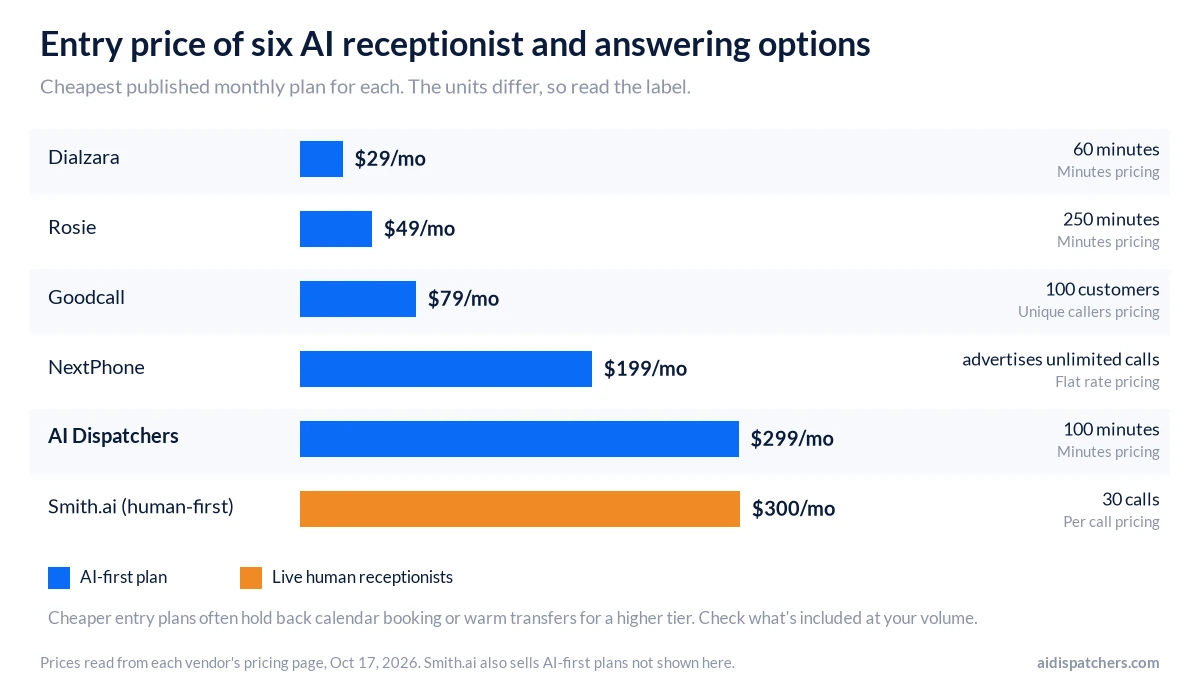
Facts only, from each vendor’s pricing page on October 17, 2026. Features change; verify before you buy.
| Pricing model | Entry price | In-calendar booking | Human or transfer options | Trial | |
|---|---|---|---|---|---|
| Goodcall | Per unique caller | $79/mo (100 customers) | A “booker” worker is one option; check which calendars connect | Transfers; you choose who receives them | Free demo agent; pay when you connect a number |
| Rosie | Minutes | $49/mo (250 min) | From the $149 plan | Warm and live transfers from $149; waterfall transfers at $299 | 7 days |
| Dialzara | Minutes + overage | $29/mo (60 min) | Calendar sync from the $99 plan | Blind transfer on all plans; warm transfer from $99 | 7 days |
| NextPhone | Flat (advertises unlimited calls) | $199/mo (self setup) | Google and Outlook on all plans | Warm and announced transfers | 7 days |
| Smith.ai (human-first plans) | Per call | $300/mo (30 calls) | $1.50/call add-on | Live human receptionists 24/7 | 30-day money-back guarantee |
| AI Dispatchers | Minutes | $299/mo (100 min) | AI booking and scheduling on every plan, with 1 calendar integration on Starter | Smart routing and transfers, emergency escalation on Growth ($499) | 14 days free |
A few other details worth knowing. Rosie says English and Spanish are on every plan, and Dialzara offers bilingual English/Spanish from its $99 plan. NextPhone’s $299 plan has its team build and tune the agent for you. Smith.ai also sells AI-first plans; check its pricing page for those. Goodcall doesn’t meter minutes at all, which helps if your calls run long.
Which one fits which business?
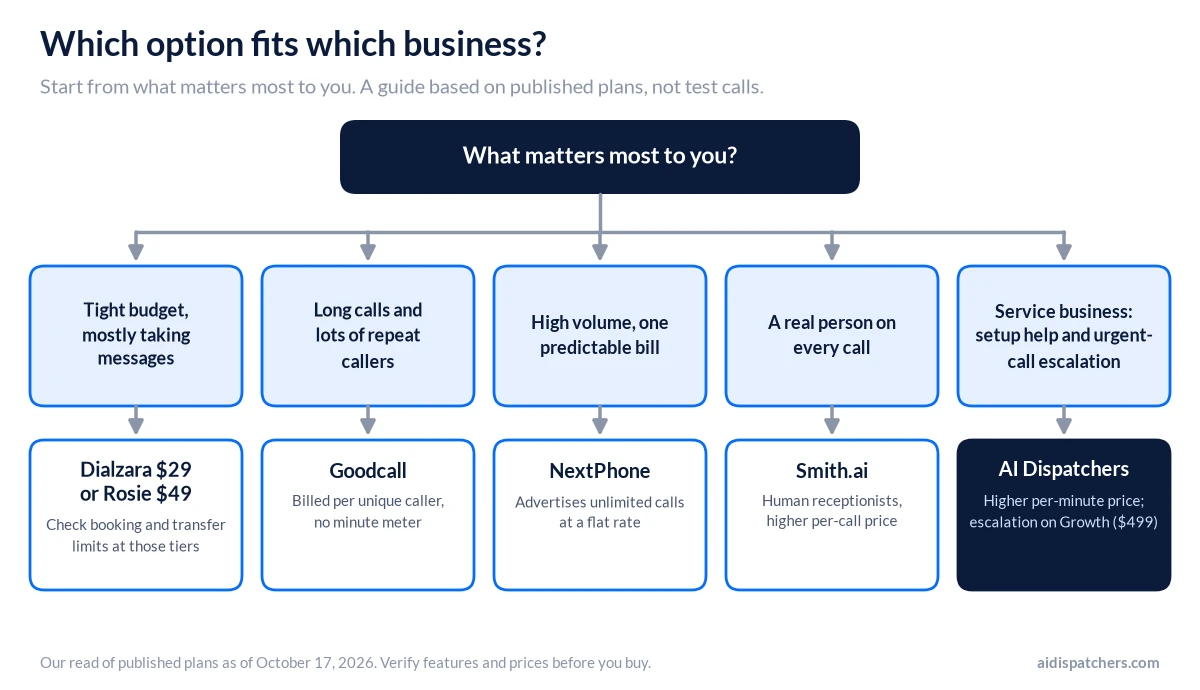
Our honest read, based on the published plans:
- Tight budget and you mostly need messages taken: Dialzara’s $29 plan or Rosie’s $49 plan are hard to beat on price. Check the booking and transfer limits at those tiers.
- Long calls, lots of repeat callers: Goodcall’s per-customer billing means a nine-minute call costs the same as a 30-second one.
- High volume and you want one predictable number: NextPhone advertises unlimited calls at a flat rate.
- You want a real person on every call: Smith.ai’s human receptionists, at a higher per-call price.
- Service business that wants help with setup and escalation for urgent calls: that’s what AI Dispatchers is built for. Every plan includes setup and onboarding support, booking and text confirmations; Growth adds emergency escalation, routing and transfers. You’ll pay more per minute than most of the AI options above, so it makes sense when a booked job is worth a lot more than a few minutes of talk time. See home services, HVAC or law firms.
How do you test an AI receptionist before you buy?
Run the same five calls on every trial. Call from your own cell, take notes, and read the transcript afterward.
- The emergency. “My water heater is leaking all over the garage” or “My brother was just arrested.” Did it recognize urgency and do what you told it to?
- The price shopper. “How much do you charge to come out?” Did it give your real answer, or make something up?
- The off-script question. Ask something it wasn’t trained on. Does it admit it doesn’t know and offer a callback or transfer?
- The frustrated caller. Interrupt, talk over it, sound annoyed. Does it stay calm and get you to a person?
- The reschedule. Book an appointment, then call back to move it. Did the calendar actually change?
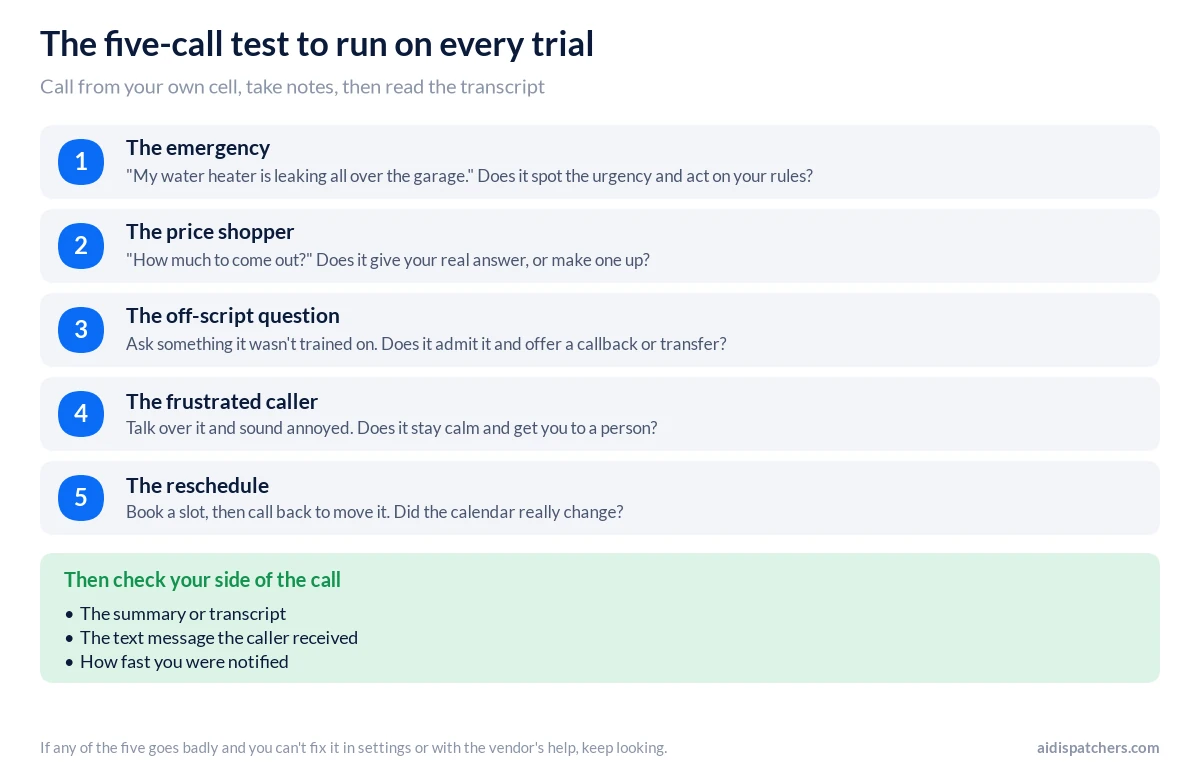
Then check what landed on your side: the summary, the text the caller got, and how fast you were notified. If any of the five went badly and you can’t fix it in the settings or with the vendor’s help, keep looking.
What red flags should you watch for?
- Prices that aren’t published, or plans where every useful feature is an add-on
- Calls described as “unlimited” without clear limits in the terms
- No way to reach a human at the vendor during setup
- Vague answers about where call recordings are stored (our security page is one example of what a vendor should spell out)
- Testimonials you can’t trace to a real business
We’d apply that last one to anyone, us included. Ask for references you can call.
Is there a free AI receptionist?
Not really, for ongoing business use, but you can try most of them free. Goodcall offers a free demo agent before you connect a number. Rosie, Dialzara and NextPhone advertise 7-day trials. We offer 14 days, which is long enough to see two full weeks of calls, including a couple of weekends.
Try ours with the five-call test
Start a trial, run the five calls above, then forward your after-hours line and read the transcripts for two weeks. If it doesn’t handle your calls the way you’d want, you’ll know before the trial ends. Our terms say a free trial converts to a paid plan unless you cancel first, so note the date. Start your 14-day free trial.
Still deciding between types of service? Read AI receptionist vs answering service vs voicemail. Questions before you start? Talk to us.
Frequently asked questions
What is the best AI receptionist for a small business?
There isn’t one winner, because it depends on how your calls go. Dialzara and Rosie have the lowest entry prices, Goodcall bills per unique caller so a long call costs the same as a short one, NextPhone advertises unlimited calls at a flat rate, and Smith.ai puts a human on every call. Pick the one that handles your five most common calls well during a trial, then compare prices at your real volume.
What is the most realistic AI receptionist?
Realism is subjective, and we haven’t run test calls against the other vendors in this guide, so we won’t name a winner. Call each one yourself and listen for how it handles interruptions, pauses and a question it wasn’t trained on. Those moments tell you more than a polished demo recording does.
Is there a free AI receptionist?
Not really for ongoing business use, though you can try most of them free. Goodcall offers a free demo agent before you connect a number, and Rosie, Dialzara and NextPhone advertise 7-day trials. Use the trial to run real calls, including a couple of weekend ones, and read the terms on what happens when it ends.
How do I test an AI receptionist before buying?
Run the same five calls on every trial: an emergency, a price question, an off-script question, a frustrated caller and a reschedule. Call from your own cell, take notes, then read the transcript and check the text the caller received and how fast you were notified. If a call went badly and you can’t fix it in the settings or with the vendor’s help, keep looking.
Can an AI receptionist book appointments directly on my calendar?
Some can and some only send the caller a booking link, so ask which one you’re buying. From the published plans: Rosie books on your calendar from its $149 plan, Dialzara syncs calendars from its $99 plan, and NextPhone lists Google and Outlook calendars on all plans. AI Dispatchers includes AI booking and scheduling on every plan, with one calendar integration on Starter.
What happens when an AI receptionist can’t answer a question?
It should say so, then either transfer the call or take a clear message. The bad version makes something up or loops. Test this by asking something it wasn’t trained on, and check which plan includes warm transfers, where the AI briefs your team before connecting, because that’s often a higher tier.
Should an AI receptionist be priced per minute, per call or flat?
It depends on your calls. Per-minute plans suit short calls, per-caller or per-call plans suit long ones, and a flat rate suits high volume where you want one predictable bill. Price last month’s calls on each model instead of comparing headline numbers.
Is an AI receptionist worth it?
It’s worth it if missed or after-hours calls are costing you booked work and you want them answered at any hour. It’s less compelling if you get a handful of calls a week, or most of your calls are complex and need a person from the first sentence. A trial on your after-hours or overflow line is the cheapest way to find out.
Talk to us about your calls
Tell us a little about your business and a specialist will get back to you. Fields marked * are required.